DesignNBuy Releases DesignO 2.0 for Custom Product Options and Pricing Configurability for WooCommerce

We’re super excited to reveal the latest update, DesignO 2.0 for woocommerce store
This new version is set to revolutionize the web to print experience, bringing an array of features designed to enhance efficiency and streamline workflows for online print shops.
Here’s What’s New and Improved: Key Features of DesignO 2.0:
In this release, we’ve made some key improvements and fixes to enhance your experience.
Seamless Product Configuration and Pricing
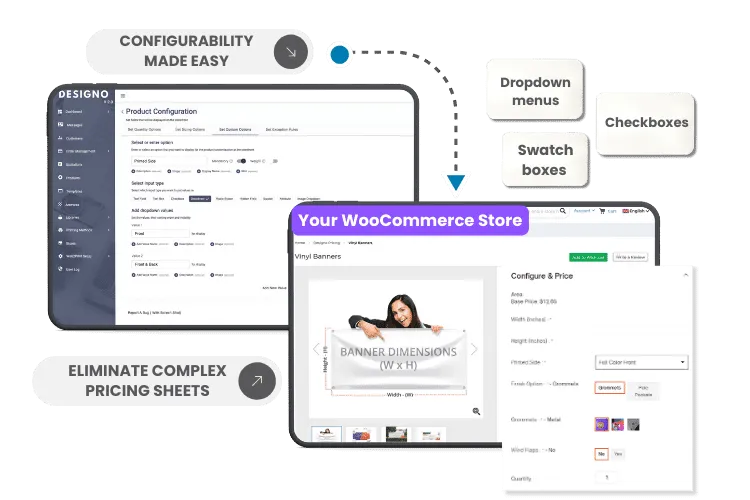
Printers can now set up custom options such as dropdown menus, checkboxes, text boxes, image dropdowns, and swatches directly within the platform. The new robust pricing engine allows for easy adjustments based on quantity, size, and other variables, eliminating the need for cumbersome spreadsheets.
Effortless Order Creation
Enhanced Quotation Management
Improved Order Management
Time-Saving Product Cloning
The new “Product Clone” feature enables Admin users to duplicate existing products and make minor modifications, saving time and effort in creating similar products.
Enhanced Communication
An improved message module with a clearer layout and enhanced date display ensures clear and concise communication, leading to a better customer experience.
Robust Third-Party Integrations
Enabling Success with Open Source Technologies
DesignO 2.0 is built on open source technologies, providing unmatched flexibility and control for businesses. This approach empowers users to customize and extend the platform to meet their unique needs, fostering innovation and ensuring long-term success.
DesignO 2.0 is more than just an upgrade; it's a paradigm shift in web to print technology. We are committed to providing our customers with top-notch solutions that empower their businesses to succeed. Built on open source technologies, this latest version ensures that our clients stay ahead in the competitive print market.”
Nidhi Agarwal, CEO of DesignNBuy,
With DesignO 2.0, we’re not just launching a new solution; we’re opening a new chapter for web-to-print success.
Explore the future of online printing with DesignO 2.0!
How to Get started
- Obtain DesignO for WooCommerce from https://wordpress.org/plugins/designo/ .
Download and install the DesignO WooCommerce product designer plugin.
Why Choose DesignNBuy
Benefit from regular updates by a skilled team of developers aimed at enhancing the plugin. Plus, our dedicated support team is ready to assist you in setting up and customizing your ideal store, utilizing all available features and hooks.
Trusted by 2000+ Print Businesses
Ready to See It in Action?
Explore our print shop platform at your convenience. Request a demo URL to experience the storefront, design tool, pricing, and much more.