Dieline Packaging Explained: Types, Uses, and How to Design It Correctly in 2026
Dieline packaging is a flat layout showing precise cut, fold, and bleed lines used to create accurate, print-ready packaging structures.
 Ajay
Ajay
Blog article content
If you work in packaging, you understand that even if a design looks flawless on screen, it may not be successful in reality.
The fault is usually not with the artwork.
It is the dieline.
Dieline packaging is a technical blueprint that directs machines where to cut, fold, and assemble a box. Small mistakes can lead to costly rework, material waste, and missed delivery deadlines.
The scale is different in 2026. Packaging runs are faster, more personalized, and quite intolerant of faults, making proper dieline design essential.
In this article, we will go over what dieline packaging is, the various types utilized across packaging formats, and how to properly design dielines to avoid production troubles and delays.
Let’s start with the basics.
What Is Dieline in Packaging?
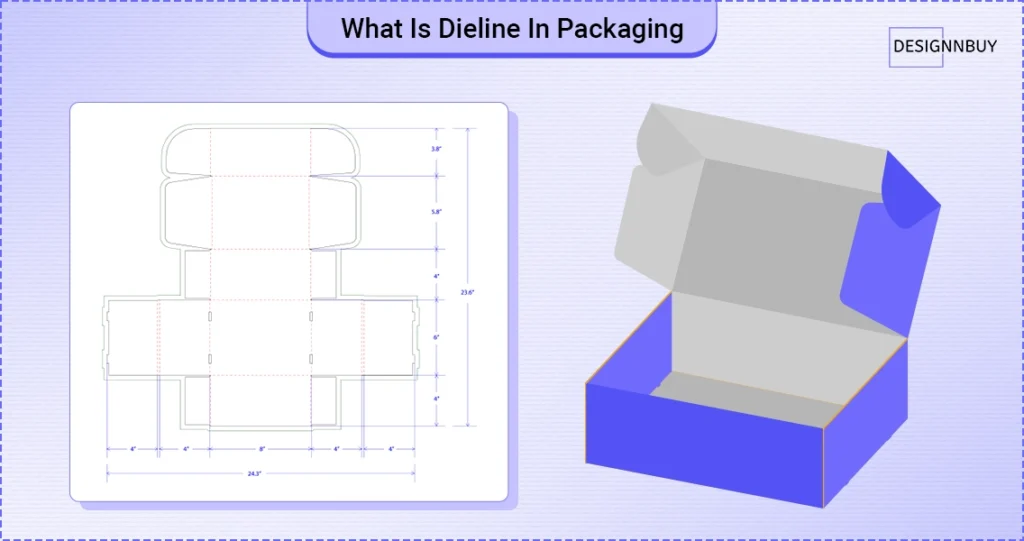 A dieline in packaging is a flat drawing that has been opened and laid flat on a table showing the exact shape of a package before it is formed into a box.
This drawing helps everyone involved understand how the package will finally look and function. Designers use it to place artwork correctly. Printers use it to check spacing and alignment. Production teams use it to ensure the package can be formed without issues.
A dieline includes visual guides such as outlines, panels, and edges that define where each part of the package exists. These guides help determine where text, images, barcodes, and logos should be placed so they appear correctly on the final box.
Without a dieline, even the best-designed packaging can fail during manufacture if it is not carefully prepped.
Why Dielines Matter in Modern Packaging Workflows
Dielines are essential throughout the whole packaging production process, not just during the design stage. When applied properly, they support teams in preserving control, precision, and consistency from the initial file to the end product.
1. Design & Prepress
Dielines serve as the structural basis for the placement of artwork during the design and prepress stages. In prepress, the same dieline becomes the reference point for checking bleed settings, safety margins, panel alignment, and overall print readiness. This is where preflight software plays a critical role—automatically validating artwork against the dieline to detect misalignment, missing bleed, or structural conflicts before files move into production.
2. Die-Cutting and Finishing
Die-cutting tools and finishing procedures are guided by dielines during production. To guarantee that packages are constructed correctly, machine operators rely on the cut paths, folds, and glue zones specified in the dieline. At this point, any error could result in material waste, weak frameworks, or miscuts.
Related Insight
Sticker production depends heavily on accurate dielines. Understanding the difference between kiss-cut and die-cut stickers helps packaging teams choose the right cut strategy, avoid material waste, and ensure clean finishing in high-volume print runs.
3. Client approvals and proofreading
Clients and internal teams can use dielines to see how the finished product will appear after it is put together. This clarity prevents last-minute adjustments that frequently cause production schedule disruptions and cuts down on approval delays, especially when the same dieline can be shared through design links, with “can view” and “can edit” (either of the accesses) keeping everyone aligned on a single version, and slowing the approval workflows.
4. Quality Control and Repeat Jobs
Dielines also facilitate long-term consistency and quality assurance. Approved dielines facilitate the management of recurring orders and provide a reference standard for inspection. Packaging teams save setup time and printing errors while ensuring consistent results across numerous print cycles by reusing validated dielines.
In practical terms, dielines maintain scalability, efficiency, and predictability in package production.
Quick takeaway: As soon as you think your packaging workflow needs to become faster and more automated, use dieline generators to control errors, costs, and turnaround times.
Common Types of Packaging Dielines
Packaging dielines differ depending on construction, material, and end use. Each type has a distinct production function, and utilising the correct dieline is crucial to avoiding setup problems, material waste, and finishing errors.
The following are the most frequently used packaging dielines in packaging and print workflows.
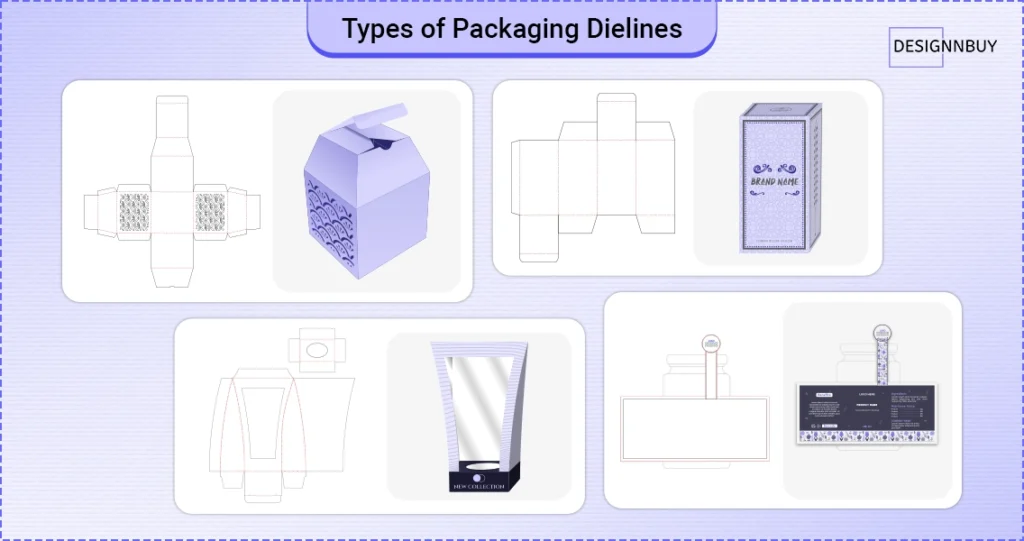
1. Box Packaging Dielines
Box dielines are the most commonly used in packaging production. They specify the structure of cartons and boxes, such as cut lines, fold areas, glue flaps, and lock mechanisms.
Here are some common examples:
Folding boxes for retail items
Rigid boxes for premium packing
Corrugated boxes for transportation and protection
Accurate box dielines provide proper construction, strength, and visual alignment once the package has been folded and glued.
2. Label and Sticker Dielines
Label dielines specify the exact form and cut path for labels and stickers. These are especially useful for die-cut and custom-shaped labels.
Key considerations include:
Layouts: sheet-based or roll-based
Precise carved paths to prevent peeling and ripping
Suitable distance between labels for completing
Cutting problems or misalignment during application might result from even minor dieline errors.
3. Flexible Packaging Dielines
Products like pouches, sachets, and wraps are packaged according to flexible guidelines. Because the material expands, bends, and seals during production, they demand additional precision.
Usually, they take into account:
Tear notches and seal regions
Folds and gussets
Variable sizing according to the volume of the product
This is where things get complicated: precise dielines are crucial for both operation and shelf appeal since flexible packaging gives little room for error.
Common Dieline Packaging Mistakes – How to Avoid Them
Even seasoned teams encounter dieline problems, particularly when files are handled manually or recycled without checking.
Common Mistakes:
Creating art without sticking to the dieline framework
Ignoring safety zones and bleed results in text or visuals being cropped.
Using out-of-date or inaccurate dieline versions among teams
Failing to compare dielines with actual production materials
How to avoid them:
Use standardised, production-approved dielines
Lock artwork to the dieline structure
Account for material thickness early
Maintain version control
Validate before production
Quick Takeaway: Dieline-related errors are a recurring packaging challenge across the industry. Even small inaccuracies in structure, dimensions, or alignment can create downstream issues that affect packaging consistency and print readiness.
How DesignO Can Help Create Accurate Dielines in Packaging
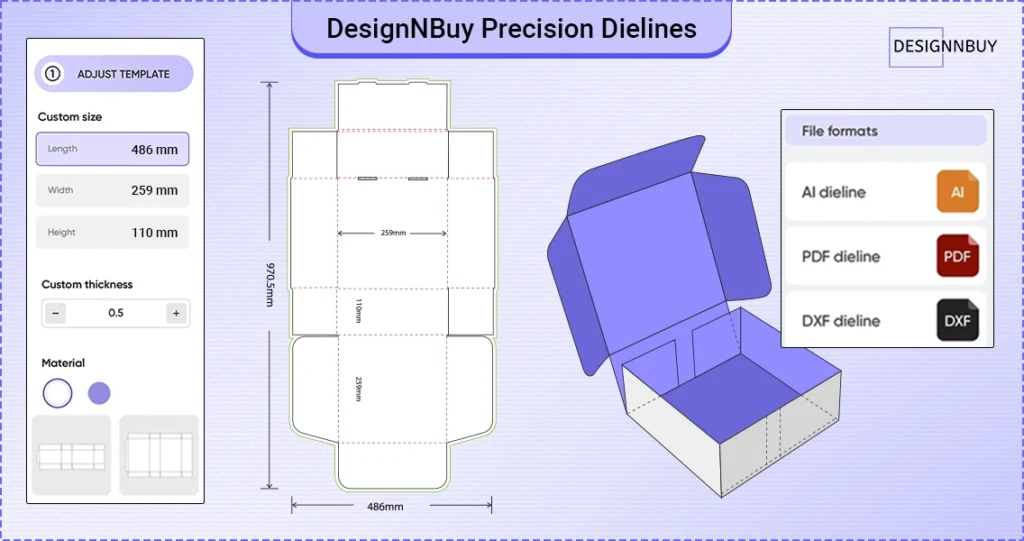
Making a dieline is just one aspect of the process; once the package is put together, determining if it truly functions is the true challenge. This is where the use of DesignO web to print tool from DesignNBuy becomes a helping hand in the packaging process.
Print and packaging teams can specify precise dieline measurements from within the workflow rather than depending just on flat dieline files. These measurements serve as structural boundaries, ensuring that panels, folds, and artwork are positioned correctly from the beginning.
The 3D product configurator is one major benefit. Before the package is put into production, it enables teams to see how it will appear when folded and assembled. This makes it simpler to identify problems like:
Artwork that extends past fold lines
Panels or flaps that are not aligned
Design components that are not part of the package structure
Teams may fix problems early rather than finding them during die-cutting or finishing by visually evaluating the design in 3D, and ultimately reducing artwork revisions.
Additionally, packaging teams can easily download production-ready dieline files, guaranteeing consistency between manufacturing and design approval. This lowers rework, cuts down on human corrections, and aids in maintaining accuracy throughout repeated tasks.
1. Predefined & Ready-to-Use Dielines
DesignO provides preconfigured dielines for common packaging types such as:
Boxes
Cartons
Folding packages
These dielines already include cut lines, fold lines, and bleed areas, reducing setup time. Apart from this, you can even upload your own dielines into your web to print storefront in AI, PDF, or DXF file formats.
2. Accurate Cut, Fold & Safe Areas
Cut lines: Indicate where the package will be cut.
Fold lines: Show where the package will be folded.
Safe zones: Ensure important content (text, logos) stays within printable areas.
This helps avoid production errors and reprints.
3. Multi-Side Support
Packaging dielines support multiple sides such as:
Front
Back
Left
Right
Top
Bottom
Each panel can be designed independently inside the DesignO editor.
4. Live Design Editor with Dieline Overlay
Customers see the dieline overlay directly in the design tool.
They can even place artwork while clearly seeing folds and cuts. This ensures designs align correctly after assembly.
5. 3D Preview with Dielines
Packaging products support real-time 3D preview. Customers can:
Rotate the box
See how artwork wraps across panels
Validate placement before checkout
This dramatically reduces design mistakes.
6. Support for Standard & Advanced Packaging Models
You can choose from:
Standard box models (basic packaging)
Advanced/Exclusive models (complex shapes and structures)
Dielines automatically adapt to the selected model.
7. Print-Ready Output
Final output files include:
Proper dieline layers
Bleed and trim marks
High-resolution print-ready files
This ensures smooth handoff to production or print partners.
Schedule Your Personalized Demo
Getting Dieline Packaging Right in 2026
Accurate dieline packaging is now necessary in 2026 to prevent blunders, minimise rework, and maintain constant production quality. Businesses that depend on precise, organised timelines are better positioned to grow without experiencing operational friction as packaging gets more personalised and time-sensitive.
Workflows that treat dielines as reusable, validated assets rather than one-time files are being adopted by contemporary print and packaging teams. This change increases long-term efficiency, speed, and accuracy.
Frequently Asked Questions
Ajay
Content Writer @DesignNBuy
Ajay Kalal is a content writer @DesignNBuy, specializing in the web to print industry. He creates clear, practical content that helps print businesses understand technology, personalization, and digital growth.
All Posts
Trusted by 2000+ Print Businesses
Ready to See It in Action?
Explore our print shop platform at your convenience. Request a demo URL to experience the storefront, design tool, pricing, and much more.